

Household spending apps come in three kinds: one linked to your bank that fills itself in, one you fill in yourself by typing or importing your bank's file, and a spreadsheet. Which one fits depends on four questions: who writes in it, how the money gets in, what it shows you, and who can see it.
01The three kinds
An app linked to your bank reads your payments and sorts them into categories. You type almost nothing. It only works with the banks the app connects, and you check its guesses afterwards: a present bought at the supermarket looks like groceries.
An app you fill in yourself takes what you type at the till, or the file you download from your online banking. It works with any bank, and you see each payment once as it comes in. It takes a few minutes a week.
A spreadsheet is free, and you decide every column. It suits one person at a computer. On a phone, or with two people working on copies, it soon gets awkward.
02An app for couples and families: who writes in it?
If you keep the household's money on your own, almost any app will do. As a couple or a family, look at how the app handles more than one person.
Some apps give each person a login of their own and show who added each entry. Others share one login among everybody. BudgetCH, the free app from the Swiss budget advice service Budgetberatung Schweiz, works that way: every family member installs it and signs in with the same login (budgetberatung.ch, read 8 November 2026).
Then there is the question of whom the money was for. An app that can put the children's shoes down to the child, even though the child never signs in, shows what each person costs. An app that only knows who paid cannot.
Who owes whom is a different question. Splitwise and Tricount are made for it, and many couples use one of them for trips and a household app for home.
03How does the money get in?
A bank connection only helps if your bank is on the app's list. Finanzguru, for example, needs a German or Austrian current account with online banking, and without one you cannot use the app (Finanzguru help, read 8 November 2026). YNAB connects banks in 18 European countries; Switzerland is not among them (YNAB help, updated 5 October 2026).
A file from your bank works everywhere. Almost every bank lets you download your transactions as CSV, and many also as camt.053, OFX or MT940. Check which of these the app reads. YNAB, for example, imports CSV, OFX, QFX and QIF (YNAB help, updated 20 October 2026). A PDF statement is meant for reading, and most apps cannot import it.
Typing an entry takes a few seconds on a phone, best at the till, while you still know what the payment was. Cash only gets in this way, whatever kind of app you choose.
04What does it show you?
Every app shows a list of payments and a total per category. That tells you where the money went. It does not tell you whether this month was normal.
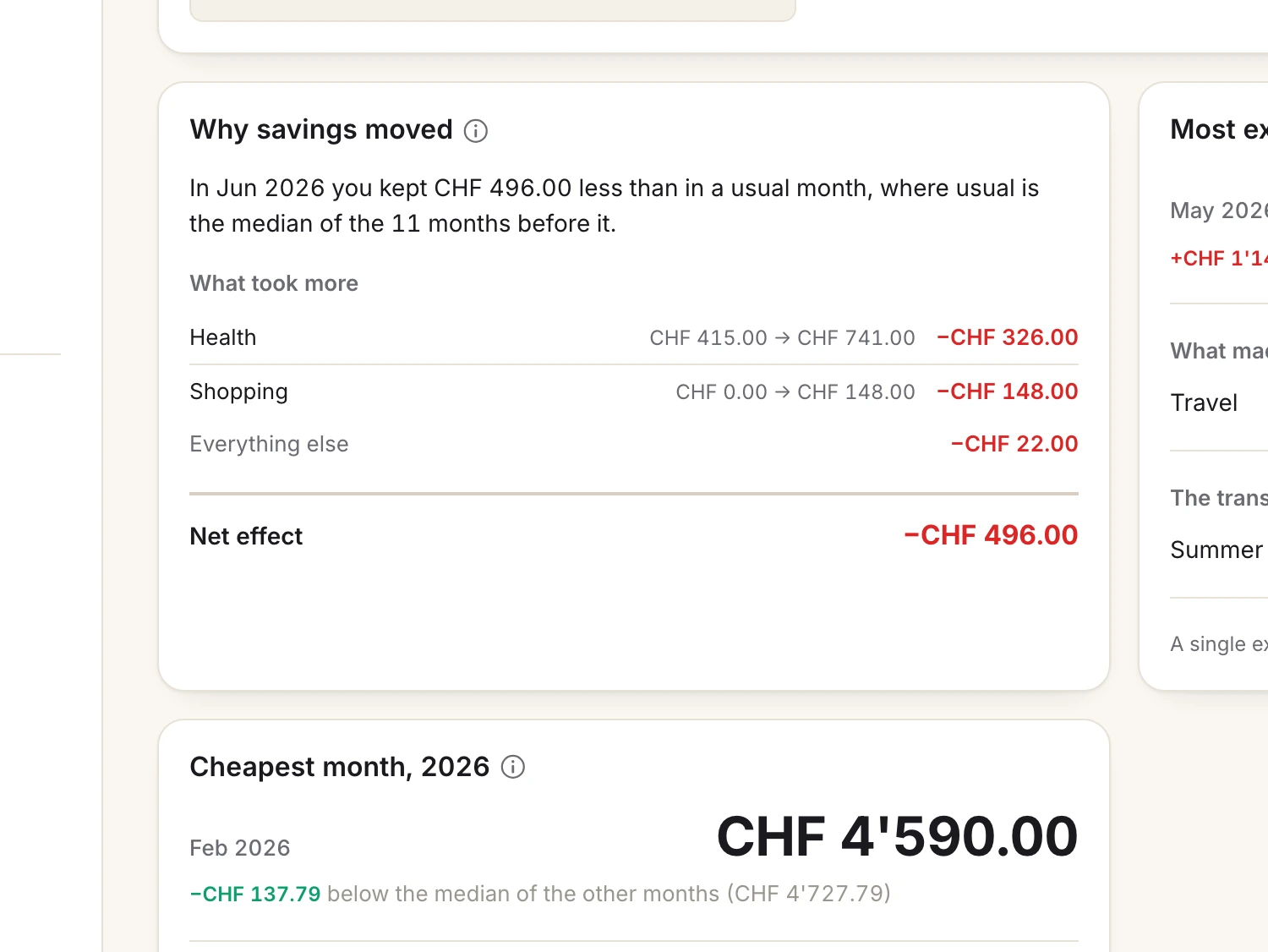
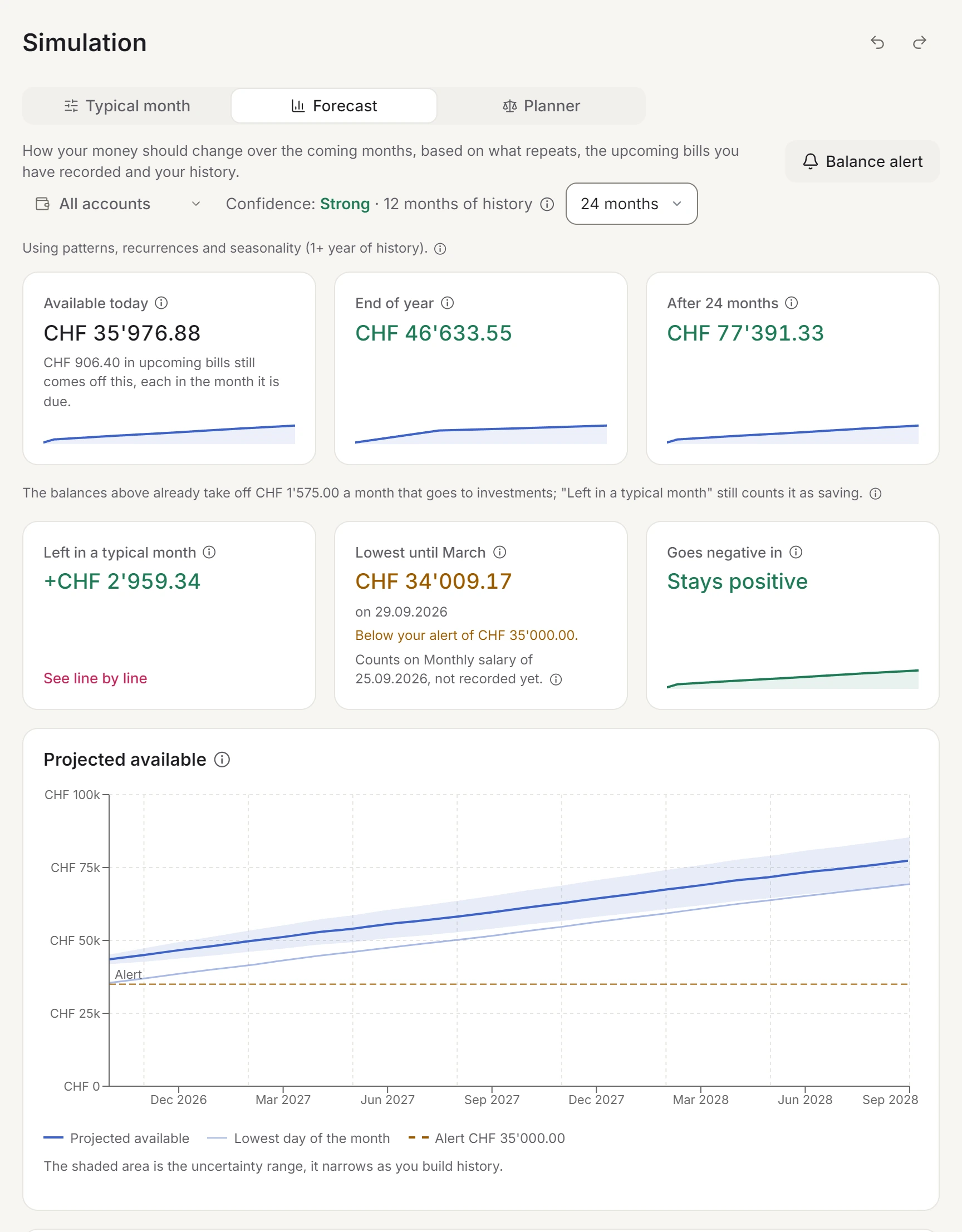
Three things are worth asking for. A comparison with your own usual month, so you see what was out of the ordinary. A way to plan bills that are not monthly, such as an insurance once a year or the electricity every three months, so the month they land in does not look like a disaster. And a look ahead: will the account last until the next salary?
Try the app with your own figures for a month before you decide. Most apps have a trial or a free version.
05Who can see your data?
With a bank connection, you let the app, and often a second company that connects apps to banks, read the payments on your accounts for as long as the permission runs. Without one, the app holds only what you type in or upload.
Look at where the data is stored, whether you can export all of it at any time, and whether an account can stay private from the others in the household. A present is no surprise if the other person can watch you pay for it.
06What Stiftung Warentest found
In October 2023 the German consumer testing organisation Stiftung Warentest tested eight widely used budgeting apps. The apps that link to a bank account, a credit card and a securities account scored better than the ones without (press release of 18 October 2023, Finanztest, November 2023).
The best app with a link was rated good and cost EUR 3.99 a month. The best one without a link was rated satisfactory. The testers found no security flaws, and noted that some privacy policies were only in English. The press release names none of the apps, and the test is three years old.
So if you mainly want an overview without typing, and your bank is covered, a linked app is the better bet. If you want to choose the categories, share the app with someone or use a bank that no app connects, the test does not decide it for you.
07Which household spending app is the best?
The one you still use in three months. From the four questions, roughly:
- You want to see where the money goes without typing, and your bank is on the list: an app linked to your bank.
- You want to choose the categories, notice each payment, or your bank is not covered: an app you fill in yourself, with your bank's file for the weeks you fall behind.
- You share the money with a partner or a family: an app where each of you has a login and every entry says whom it was for.
- You keep the money on your own and like formulas: a spreadsheet.
08When Spendhog fits, and when it does not
Spendhog is the app we make. It is an app you fill in yourself: you type in entries or import your bank's file as CSV, camt.053, OFX or MT940. It never connects to a bank, so it works with any bank, and it never asks for your bank login. A PDF statement cannot be read yet.
One household holds everybody. Up to three people sign in, each with their own login, and you can add as many members as live with you, children included, under Who it was for. Any account can stay private with Hide from other members.
Budgets can repeat every 1, 2, 3, 6 or 12 months, so a quarterly bill does not wreck a month. The app explains the month in words, compared with your own usual month. Its forecast looks ahead for all your money or for one account, such as the joint one, and a Balance alert tells you up to six months ahead when it may fall below an amount you choose.
Spendhog does not split bills or work out who owes whom, and it needs a connection. If you want your payments to arrive by themselves, an app linked to your bank suits you better. You can try Spendhog free for 30 days, with no card and no bank login. The founder price is CHF 8.99 a month for the first 30 households that subscribe, for as long as the subscription runs.
Questions about this page? Reach us any time and we'll walk you through it. info@spendhog.com